PDA

View Full Version : Best possible pictures..


Maxorin
12-26-2007, 01:39 PM
Any suggestions on what equipment I need to take perfect crystal-clear pictures of even the smallest details? I`m building a site with norwegian minting errors, and dont want to post any more pictures before I get the quality I`m after. It`s so annoying and a waste of time to have to change the pictures later.

Have tried a variety of different scanners, some do the job, but I need it to be better than just "doing the job".

Have asked in some photo-stores, but to my surprise most of them just shrugged their shoulders and said that it would be difficult, they had never
had a customer before with this request! Some of the others said I needed some real high-tech stuff, at a price around $2000 and up.

Is this what I need maybe? http://cgi.ebay.com/5X-10X-15X-30X-COIN-MICROSCOPE-BOOM-LIGHT-CAMERA_W0QQitemZ170138172738QQihZ007QQcategoryZ582 92QQcmdZViewItem

Grateful for tips, have alot! of pictures to post and eger to get started. A little unsure about what I`ve been told so far, one store say one thing and the next say the complete opposite.:confused: Dont want to spend thousands of $ if I`m not sure it will get me the result I need.

wavysteps
12-26-2007, 03:00 PM
Hi Maxorin and welcome to the CONECA forum.

Hopefully I can answer your question. First, you are on the right track concerning a camera instead of a scanner; scanners just will not do the job no matter how hard you try.

To give you an idea of what I do, I'll give you the equipment used in my photos. A 7.5X to 35X zoom binocular scope. This gives you a bit more flexibility with the varying zoom option instead of the fixed 5X, 10X, etc. For a camera, I was using an Olympus 460D zoom, 1.3 Mpixels but this Christmas, my wife gave me a Cannon A720, 8.0 Mpixels. The last and probably the most important part is a photo editing program and in this case I use a Adobe Photoshop 7.0.

With this set up, you can shoot straight through either eye piece of the scope with more than satisfactory results. One word of advice concerning shooting through the scoop; make sure that the housing for the lens sits on top of the outer ring of the eye piece on the scope. For some reason, if it sits on the glass (lens) itself, the camera will not focus.

All total, including the program, it should run less than $600.00 (camera = $200.00, scope = $200.00 to $250.00, Abode Photoshop Elements 6.0 = $100.00).

Hope that this helps.

BJ Neff

Maxorin
12-26-2007, 03:53 PM
Thank you very much, this was very helpful. Good to hear somebody say that scanners dont work, period. Until now, I`ve been told different things, so have ended up with a "try/fail" approach, and never get the result I`m after.
Very frustrating. Belive I have tested 10 different scanners in the last 6 months.

I have no experience with cameras and photos, so I`ll have to learn a little about that then. I`ve done some checking, and the CANON PowerShot A720 IS is availabile here in norway at a decent price. Very happy to see that I dont have to spend more than 1/3 of what I thought. More money for coins :)

Regarding the binocular scope you mention, is there any brands you prefer or are they pretty much the same? (or is there one for that spesific camera?).

Actually a little surprised to hear this is all i need to do. This scope, does it attach to the camera, or are you just holding it and taking the pictures?

Think I have to do some shopping asap and by these things, can hardly wait :) thank you again

maxorin

russellhome
12-26-2007, 04:09 PM
I get most everything I need out of my digital camera. My older digital camera did full photos very well -- but it did not have the capabilites to get me the macro photos I wanted. When I recently went to replace it, I got the same kind of answers as you from the sales people. They were no help at all. But I did bring a small tripod and some coins along with me and they let me test the macro feature of several cameras. I was amazed and the difference in capabilities - even for different cameras from the same brand. I ended up with the Canon Powershot A640. It is a 10 MP camera -- and I can get 99% of what I need as far as detail close-ups go.

But even with the perfect camera, it takes practice and experimentation to get the photos the way you want. I use a mini-tripod, one or two desk lamps, and often paper or white plastic between the light and the coin to defuse the light.

And then, of course -- you NEED software (photoshop, Corel Photopaint, etc) to crop, resize, and perfect your images. Once you get a system down, it goes pretty quickly.

Examples:

The photo below is about as close as I can get. It was taken at the full resolution of the camera and cropped to show just the detail I wanted. What you see in the photo is probably about a 1 cm area of the coin.

http://www.idsimis.com/photos2/ger1914_1mrk_dd04.jpg

And for full coin shots, 10 MP is way to big for anybody's needs. So you need to have software to resize the image. The photo below was cropped and resized to about 5% the size of the original image.

http://www.idsimis.com/photos2/cud21975d_obvside2.jpg

For some detail, I wish I had a microscope - and I hope to get one someday. But it is possible to get nearly everything you need from the right digital camera at less than $300.

wavysteps
12-26-2007, 04:45 PM
I shoot pictures just holding it in my hands and with the scopes eye piece abut against the lens housing, there is no movement.

As far as scopes, just as long as they are a zoom and around 7.5X - 10X to 35X - 40X and you should be all set. Actually, Ebay has some for less than $200.00 that sound fairly good.

The only problem with the scopes though is the lighting and that you are going to have to fool around with. However, an external lighting source is a must, but then again not at all expensive. Some people even use a pen light with excellent results.

As far as getting the hang of all this, we are here to help.

BJ Neff

Maxorin
12-26-2007, 05:09 PM
Fantastic, thank you.

Has anyone tested the microscope i mentioned a link to earlier?
When I saw this a while back i thougt "bingo, thats it"
it looks great for those extra small things, thinking of buying one
just to test it.

russellhome
12-27-2007, 01:22 PM
Maxorin

I've searched the web for various microscope options -- I've been thinking about getting one as well. I like the one you point to in your link. The way it is mounted, it would surely give you maximum flexibility - both for lighting angles and the ability to put larger objects under it (like coins in coin albums or encased sets). But $500 is more than I'd be willing to pay just to test it. The examples they show in the listing are all great -- except the coin shot. It is less than impressive -- hopefully the equipment is capable of better than that.

If I understand correctly, Euros are strong and Dollars are weak right now. Perhaps it is not a huge risk for you. If you decide to splurge and buy a nice microscope, please post some of your photos here.

Maxorin
12-27-2007, 02:08 PM
I`ll post some pictures here as soon as I get a hold of one.
I`m trying to find if someone sells these microscopes here in
norway, more convinient in case of having to return it, and,
the shipping to norway would cost me $250 :) that gets
a little steap, but if I dont find it here, I`ll try one from ebay.

Looks like the zoom is fixed, thats a drawback, guess it would
be better with a zoom like the binocular scope mentioned earlier
in the link have.

Maxorin
01-03-2008, 12:09 PM
I shoot pictures just holding it in my hands and with the scopes eye piece abut against the lens housing, there is no movement.

As far as scopes, just as long as they are a zoom and around 7.5X - 10X to 35X - 40X and you should be all set. Actually, Ebay has some for less than $200.00 that sound fairly good.

The only problem with the scopes though is the lighting and that you are going to have to fool around with. However, an external lighting source is a must, but then again not at all expensive. Some people even use a pen light with excellent results.

As far as getting the hang of all this, we are here to help.

BJ Neff


Could you give me a link to a scope on ebay you think is good/would recommend? There was alot of different ones there. Been to some stores here, but they had to check with their supplier etc.. Might be just as easy ordering it on ebay.

Finally got a camera anyway, after almost buying the canon A720, I changed my mind and almost bought the canon powershot A640, changed my mind again :) and got the canon powershot A650, pretty much the same as A640 i guess, but with 12 MP. Really looking forward to testing it and getting my hands on a scope.

Maxorin
01-03-2008, 12:17 PM
Maxorin

I've searched the web for various microscope options -- I've been thinking about getting one as well. I like the one you point to in your link. The way it is mounted, it would surely give you maximum flexibility - both for lighting angles and the ability to put larger objects under it (like coins in coin albums or encased sets). But $500 is more than I'd be willing to pay just to test it. The examples they show in the listing are all great -- except the coin shot. It is less than impressive -- hopefully the equipment is capable of better than that.

If I understand correctly, Euros are strong and Dollars are weak right now. Perhaps it is not a huge risk for you. If you decide to splurge and buy a nice microscope, please post some of your photos here.


By the way, we still kling on to our KRONER coins here :) no euros for us norwegians, all our neighboring countries joined but not us. Typical norwegian. But from a coin collecting point of wiew, we really dodged a bullet there, I have seen the tests of the coins we would have ended up with, and it was the ugliest coins I have ever seen. There was absolutely nothing appealing about them.

Maxorin
01-20-2008, 03:22 PM
I shoot pictures just holding it in my hands and with the scopes eye piece abut against the lens housing, there is no movement.

As far as scopes, just as long as they are a zoom and around 7.5X - 10X to 35X - 40X and you should be all set. Actually, Ebay has some for less than $200.00 that sound fairly good.

The only problem with the scopes though is the lighting and that you are going to have to fool around with. However, an external lighting source is a must, but then again not at all expensive. Some people even use a pen light with excellent results.

As far as getting the hang of all this, we are here to help.

BJ Neff


Have been fooling around a few days now with my new canon powershot a650is. And it is driving me up the wall :) mentioned earlier that I have no experience with photo-equipment, so that might be the problem. But its very user friendly and easy to use. Whats irritating, is that the camera get great pictures of everything else close up (it has macro, *24 zoom and 12MP), but as soon as I try to photograph a coin, it all goes to h... Get a yelloish hue on the pictures that isn`t really there. It just wont capture the true color of the coin. Have spent hours with different lighting and adjusments on the camera, nothing works.

Do you adjust these things with software? I`m used to scanners and one good thing about them, is that at around 12,000dpi they capture the color and things like that very well and I rearly have to adjust anything. And thats what I like, I like to take a picture of the coin the way it looks and not tamper with any colors or anything. Another thing that bothers me with the camera, if I take a picture of the front and one of the back of a coin, theres small differences in color and other things, so they dont look the same. This also is a new problem for me since I`m used to scanners, with them I get the same "look" when taking pictures of both sides of coins.

Any tips would be very helpful:confused:

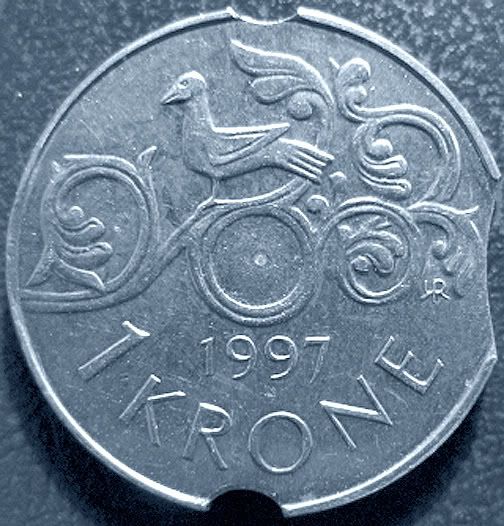
The coins in the pictures are really silvery/metal colored, but as you see, they look baaad.

wavysteps
01-20-2008, 04:08 PM
Is this the color of the actual coins?

http://i49.photobucket.com/albums/f292/Wavystep2003/001.jpg

http://i49.photobucket.com/albums/f292/Wavystep2003/002.jpg

If it is, then it is all in the editing program. I accomplished this with Adobe Photoshop 7
BJ Neff

Maxorin
01-20-2008, 05:50 PM
Is this the color of the actual coins?

http://i49.photobucket.com/albums/f292/Wavystep2003/001.jpg

http://i49.photobucket.com/albums/f292/Wavystep2003/002.jpg

If it is, then it is all in the editing program. I accomplished this with Adobe Photoshop 7
BJ Neff

Well, its closer in that the coin has lost the yellow hue, but the thing is that now it looks edited. Everything is even grey, including the background, the coins natural look is lost- the shine etc

wavysteps
01-20-2008, 06:03 PM
To be honest with you, I just took a shot at the color. Other adjustments can be made. Basically, I just wanted to give you an idea what can be accomplished with an editing program. Of course, with coin in hand, you can adjust to a specific color, sharpness and intensity with the actual coin to look at and compare.

BJ Neff

Maxorin
01-20-2008, 06:07 PM
Well, its closer in that the coin has lost the yellow hue, but the thing is that now it looks edited. Everything is even grey, including the background, the coins natural look is lost- the shine etc

Heres an example of what I mean, this picture is done with a scanner. Here you see some small spots and specks as they look on the coin, and theres no yellow hue. This picture is not edited in any way, (except the file size is compressed because its almost 2gb to start with) and it resembels the coin nicely, a natural look.

Took some pictures with the camera, and any editing i try, makes this natural look disappear.

Maxorin
01-20-2008, 06:10 PM
To be honest with you, I just took a shot at the color. Other adjustments can be made. Basically, I just wanted to give you an idea what can be accomplished with an editing program. Of course, with coin in hand, you can adjust to a specific color, sharpness and intensity with the actual coin to look at and compare.

BJ Neff

But when you have for example 400 coins and need two, three pictures of each, thats a pretty massive time-consuming job to edit each one and compare agains the coin to match.. Lifes to short :)

wavysteps
01-20-2008, 06:18 PM
Yes it is time consuming. I know for I have done well over 600 coins for wavy step and trail die files, plus have shot numerous other coins for various reasons.

Have you tried fooling around with the "white Balance" setting on your camera?

BJ Neff

Maxorin
01-21-2008, 04:45 AM
Yes it is time consuming. I know for I have done well over 600 coins for wavy step and trail die files, plus have shot numerous other coins for various reasons.

Have you tried fooling around with the "white Balance" setting on your camera?

BJ Neff


Come to think of it, forget my comment of it beeing time-consuming, because to scan a coin at high dpi also takes alot of time.

Just am a little surprised because I assumed that a camera would pick up a objekts natural look and shine without problems or massive editing. And it does, on flowers and bugs and other small things. But when I put a coin in front of it, something changes. It seems odd to me that a new, good camera
cant handle this without having to edit. What I`m after, is a way to simply lay out the coins I need pictures of, take the pictures, and end up with a nice consistent look. With all the advances in technology I assumed that this was a piece of cake, no problem. But it seems to be much more difficult than I imagined.

My problem is that I have a massive collection just laying around waiting to be taken pictures of. Some time ago I began this massive job, made about 200 pictures as a start and posted them on a website, but after a while I decided the quality wasn`t good enough, so erased everything and have to start over. Dont wont to do that again! :) what a waste of time. So I`m spending less and less time with the coins, and more and more struggeling with the equipment. Still loving the coins, beginning to really hate taking the pictures :)


I`ll have to keep working at this, and learn more about photgraphy it seems.
I`ve tried different settings on the camera, but ends up with different unnatural looks.

wavysteps
01-21-2008, 08:59 AM
One day it will all come together for you for the photography end. It just takes finding the right lighting and camera settings and when that happens, shooting pictures becomes a lot easier. One thing that I do suggest is not to become frustrated at your results; try not to capture the fineness of color, however, try to capture the true nature of the error. I might be wrong, but I think that clarity, sharpness and proper presentation of the subject being photographed is more important than the color. However, that is my opinion.

BJ Neff

Maxorin
01-21-2008, 09:24 AM
One day it will all come together for you for the photography end. It just takes finding the right lighting and camera settings and when that happens, shooting pictures becomes a lot easier. One thing that I do suggest is not to become frustrated at your results; try not to capture the fineness of color, however, try to capture the true nature of the error. I might be wrong, but I think that clarity, sharpness and proper presentation of the subject being photographed is more important than the color. However, that is my opinion.

BJ Neff

Yes you are right, guess I have to work a lot more on this picture-stuff.
Hope I one day find the perfect recepie.

And you`re right about those things beeing more important than color. But i would love to be able to take pictures that capture it all; color, clarity, sharpness, shades, everything :) that is my goal.

I may have to high expectations for the camera I use. Maybe I need to take it up a couple of steps, and try some high-tech, state of the art professional stuff.

Maybe I should start at the other end also, find pictures that have the look I`m after, and find out what equipment was used. Because I see breathtaking pictures every day and think "theres the quality I`m looking for."

Anyway, thank you for your replys.

jeankay
02-05-2008, 07:13 PM
Hi,
I do not get on this site as often as I would like, but thought I should share what I have discovered.
First, I have a new Canon power shot, SD850IS Digital Elph. It claims to have 8.0 mega pixels and 4x optical zoom, with an image stabilizer and face detection.
Most of this means nothing to me because I picked it out by going to a large camera store and had the clerk take pictures of different coins I had with me to see which camera would fit my needs as best with the money my husband was willing to spend.
I cannot even begin to think I will ever understand everything this camera can do. The little instruction book keeps referring back to the big book and vice-versa. It may as well be in a foreign language that doesn't exist.

What I do know is after hundreds and hundreds of pictures, I found that yellow lighting, as is in most light bulbs, is pretty much okay for copper coins. A whiter light is better for silvery coins. I use a regular goose neck desk lamp with a power save light bulb that gives the yellowish tinge.

The other lamp I happen to have is an adjustable Ott-Lite. It has a bulb that gives daylight lighting. The OttLite is pricey, but there are others out there on the internet that have the same bulb quality that might be more affordable.
I never shine the light directly at the coin as it will give a flash back look.
Speaking of flash... I never use the camera's flash for the photography.

Have you noticed that your camera has what I call a pre-click? The idea is to use a neutral background... a medium shade of gray... that you can point the camera at to pre-set the contrast with this pre-click, as most cameras these days are capable of doing, and then move the camera back to your object for the final click of the button. Sometimes this does help the camera adjust its color balance and capture objects that are not natural. The pre-click is also used to eliminate redeye. (Yes I know this isn't a very technical explanation, but it is the best I can do).

Because my camera is limited as to the distance you can be from the coin to focus properly you need to be very steady with the camera. After I am satisfied with the picture in the camera's window I will transfer it to my computer and take another look with Paint Shop Pro, which is where I can magnify and crop. Sometimes the picture isn't as clear as I would like, but to have that I would need to spend close to 1,000 usd to get the very best.

Just wanted to share my experience in my camera 'expertise'... yeh, right.
Just plain luck most of the time.

jeankay

mustbebob
02-05-2008, 10:19 PM
I have been taking close-up photos of coins for many years, and trial and error was an inevitable process for me. Out of the thousands of photos I have taken for coppercoins, I always see where there was room for improvement.
I do agree somewhat with Jeankay's statement about lighting, and I have used that process before. However, I can get good color on both copper and silver coins with diffused light, rather than yellow or white. I have a dual goose neck fiber optic light box, but to keep the glare and colors more natural, I diffuse the light through a white coin tube. It works great.
I have seen some terrific pics posted on this forum as well, and I love the fact people are sharing their knowledge. A little patience, and maybe a good idea or two can sure make a difference int he quality of your pics.

Maxorin
02-06-2008, 09:55 AM
Hi,
I do not get on this site as often as I would like, but thought I should share what I have discovered.
First, I have a new Canon power shot, SD850IS Digital Elph. It claims to have 8.0 mega pixels and 4x optical zoom, with an image stabilizer and face detection.
Most of this means nothing to me because I picked it out by going to a large camera store and had the clerk take pictures of different coins I had with me to see which camera would fit my needs as best with the money my husband was willing to spend.
I cannot even begin to think I will ever understand everything this camera can do. The little instruction book keeps referring back to the big book and vice-versa. It may as well be in a foreign language that doesn't exist.

What I do know is after hundreds and hundreds of pictures, I found that yellow lighting, as is in most light bulbs, is pretty much okay for copper coins. A whiter light is better for silvery coins. I use a regular goose neck desk lamp with a power save light bulb that gives the yellowish tinge.

The other lamp I happen to have is an adjustable Ott-Lite. It has a bulb that gives daylight lighting. The OttLite is pricey, but there are others out there on the internet that have the same bulb quality that might be more affordable.
I never shine the light directly at the coin as it will give a flash back look.
Speaking of flash... I never use the camera's flash for the photography.

Have you noticed that your camera has what I call a pre-click? The idea is to use a neutral background... a medium shade of gray... that you can point the camera at to pre-set the contrast with this pre-click, as most cameras these days are capable of doing, and then move the camera back to your object for the final click of the button. Sometimes this does help the camera adjust its color balance and capture objects that are not natural. The pre-click is also used to eliminate redeye. (Yes I know this isn't a very technical explanation, but it is the best I can do).

Because my camera is limited as to the distance you can be from the coin to focus properly you need to be very steady with the camera. After I am satisfied with the picture in the camera's window I will transfer it to my computer and take another look with Paint Shop Pro, which is where I can magnify and crop. Sometimes the picture isn't as clear as I would like, but to have that I would need to spend close to 1,000 usd to get the very best.

Just wanted to share my experience in my camera 'expertise'... yeh, right.
Just plain luck most of the time.

jeankay


Good to hear in a way that I`m not the only one having some difficulty with instruction books :) for cameras anyway. It just seems like we have too many choices, had my camera for about a month now, and still there are things I`m not exactly sure of how works :)

Noticed this "pre-click" function not to long ago, seems very useful, in the process of learning it (hopefully) :)

Lighting is a chapter of it`s own. I have found that the color of the light can be adjusted with some of the option on the camera, but it`s better to have a good, smooth lightingsource with different bulbs you can use to begin with.

Here`s a trick I found (dont clame to have invented it :))that makes the coin almost look like it`s floating above what it`s resting on, especially if you use a white background (sheet of paper etc.)

- Take a small table or anything that you can use that has a flat top, and
the top can be lifted open. (hinges or something like that in one end) Or make your own tilted surface.

hm, this was a bit hard to explain i notice now :) but I`ll give it a try.

- Put something under where you can open it, for example, I use a pack of smokes. But anything will do, just put something under there so the top tilts slightly towards you. (but not so much that the coin slides off, be carefull).

- Place one lamp in front of the tilted top and one behind, so they point toward each other. The best to use, is lamps that stand on the floor and have an end you can "twist" and move around. And, the absolute best is the ones you can adjust seemlessly from almost no light to very bright. Ordinary on/off works good, but i think the adjustable ones are to prefeer. Align the lightbulbs/lamps so that they are at the same height as the flat tilted top (the lamp at the back will then be a little bit higher than the one in the front of course), then adjust both lamps up 2-3 inches, so when you put a coin on the flat tilted top, both light shines down/towards it with an tilted angle. The lights should meet excatly where the coin is.

- Now when you place your camera right above the coin for a nice close-up shot, the light from both lamps should flow freely between the camera and the coin, without any shadow from you or the camera.

Try to adjust the lights to the point where there is no shadow from the coin itself on either side of the coin. The lights "cancel" each other out in a way.
You can also get a nice "sparkle" effect on high-points on the coin by adjusting the lights to shine a little brighter. (not sure if this has something to do with the type of bulb used).

Still working a little on this, but it looks to me like the tilted surface and light from two sides can give some nice results. Especiallly with adjustable lights, it looks promising. Have done the same with a flat surface, for some reason it dont look as good.

Hope this made a little sense :) It may be something, it may be nothing, I tried anyway.

jeankay
02-06-2008, 06:52 PM
Okay, I think I will check out lighting this weekend when I can get close to a large town. I bet there are some little lights I can use on my desk that will give me more options with angles and such. If I find something terrific I will get back here and share my discovery. In the meantime, I will keep taking picture after picture until one of them is just right. Isn't digital photography great for this? No film to buy and develop and waiting for pictures... teehee. And I thought I would dislike it a lot. ;o)
jeankay